Clients
Scout: requests and analysis
Client requests from arrival to release: the request pasted as it is, the analysis that reads the project, the points, the decisions, the phases, the filters and what each request costs.
Scout is the workspace's fourth tab. It's for whoever works for clients: every request (a task, a report, an email) follows its path from analysis to release, with the questions to ask, the decisions taken, the documents for the client and the agents working on it. Everything stays on your computer, one file per workspace.
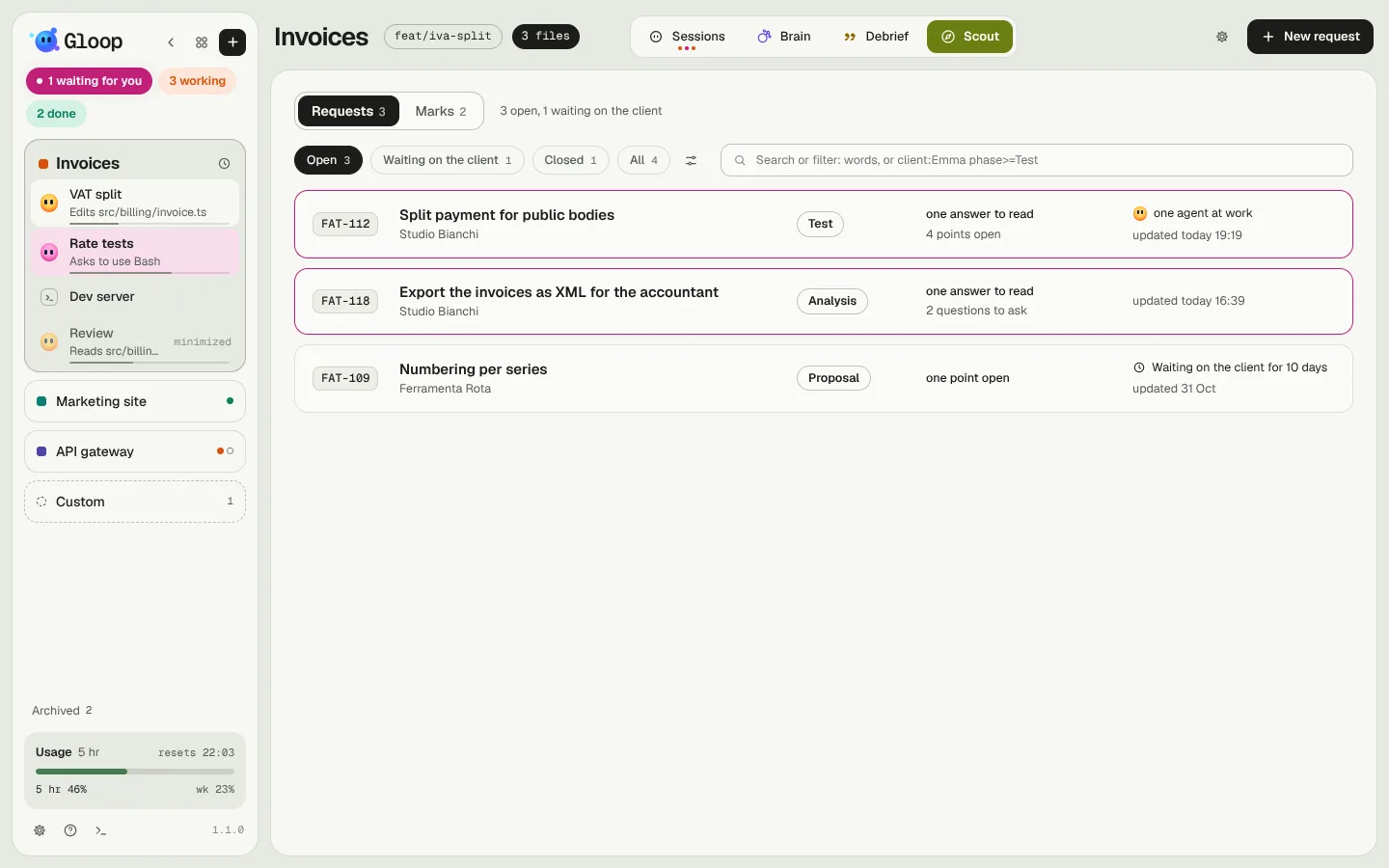
At the top, two tabs: Requests and Marks, the things found while working, with no client.
A new request
New request takes the task pasted as it is, from Jira, an email, a document: Gloop recognises the key, title, client and the acceptance criteria, which become the first points. Below you can add images and files (dragged, pasted with Ctrl+V or picked): they stay with the request and the analysis reads them.
You can also choose where the request reads: see Which code it reads.
A request's page
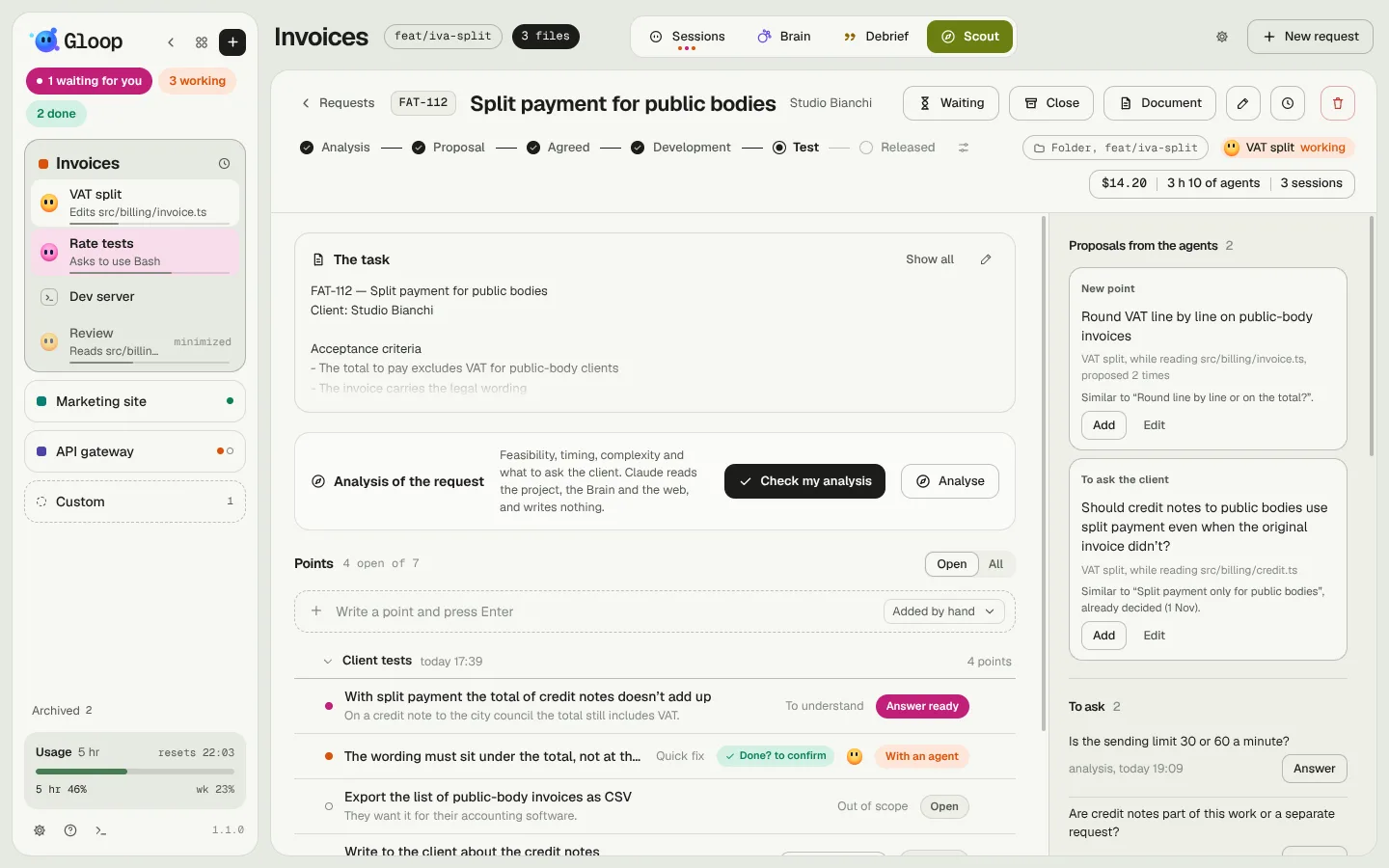
- At the top the key, the title, the client, and the phases in a line (Analysis, Proposal, Agreed, Development, Test, Released: they're yours, you rename and reorder them). The phases have no compulsory order: going back only asks you why. On the right, the code it reads, the agents at work and the cost.
- On the left the work: the task as it came, the request's analysis, the points split by round (the first one, the client's returns, those added by hand).
- On the right the client: the agents' proposals, To ask, Decided, For the client (the documents), the files to keep in mind and From the client, where you drop what they send. See Documents, calls and delivery.
- The clock opens the request's history.
The analysis
Analyze has the request read by a Claude that only reads: the code, the git history, the Brain, the request's files, even the web. It never writes anything in the project. The answer has fixed sections, and every statement is marked Checked in the code or Guess, to check: you always know what it rests on.
At the top there's In short: the quick answer, the one to say out loud to a client.
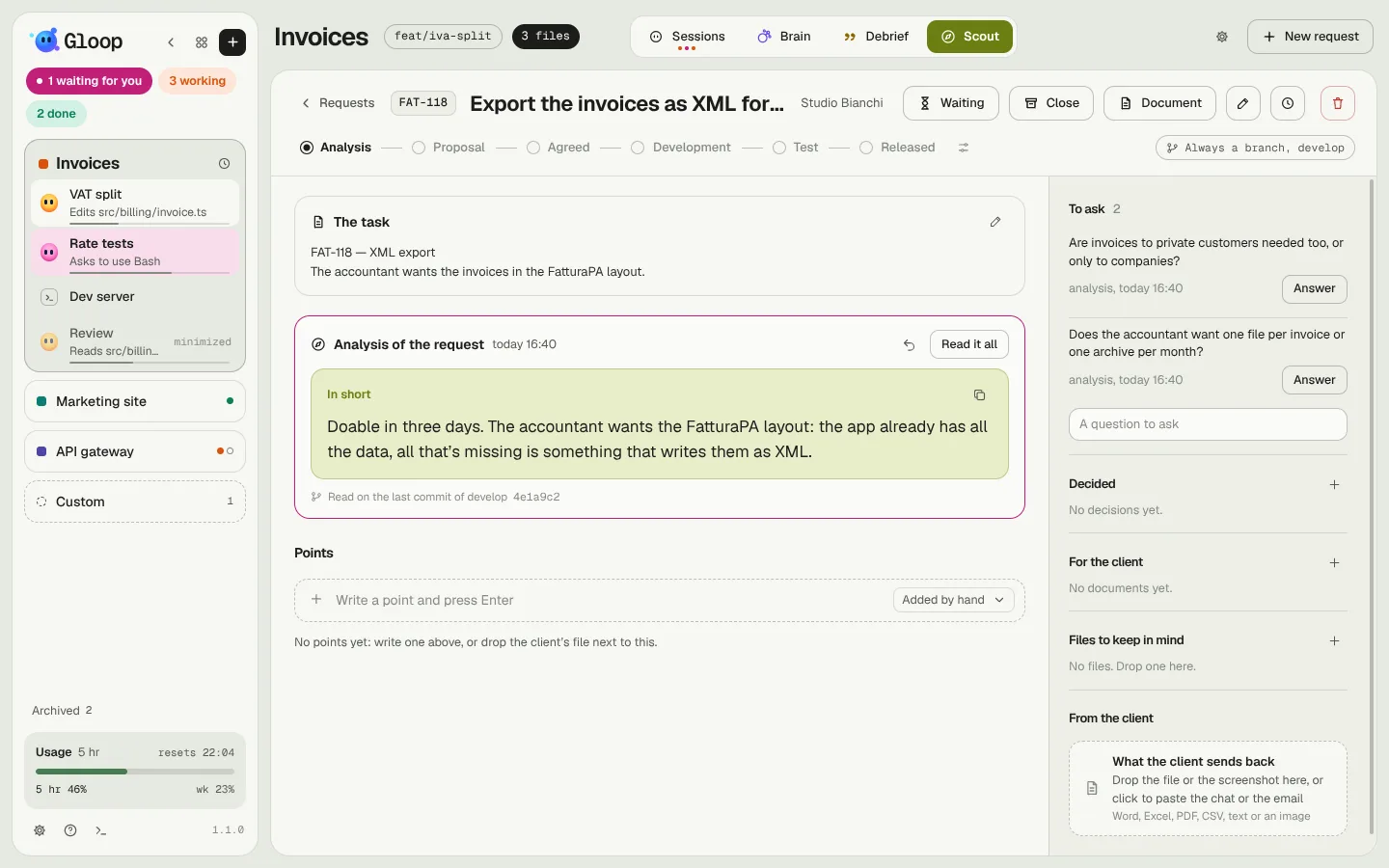
Analyses run in the background, three at most at once: you can switch tabs, and when one is ready a toast, the notch and the mark on the Scout tab tell you. Cancel stops it.
Have you already made an analysis yourself, maybe sent to the client? Drop it among the files to keep in mind and use Check my analysis: instead of redoing it, Claude checks it against the project and the Brain and tells you what holds, what to correct, what's missing and which risks you didn't consider.
Points
Every point is something to do or understand, with its kind (quick fix, to understand, to decide, out of scope) and its state (open, with an agent, decided, done, dropped). A click opens the point's window: on the left the client's words and the directions for Claude, on the right the answer.
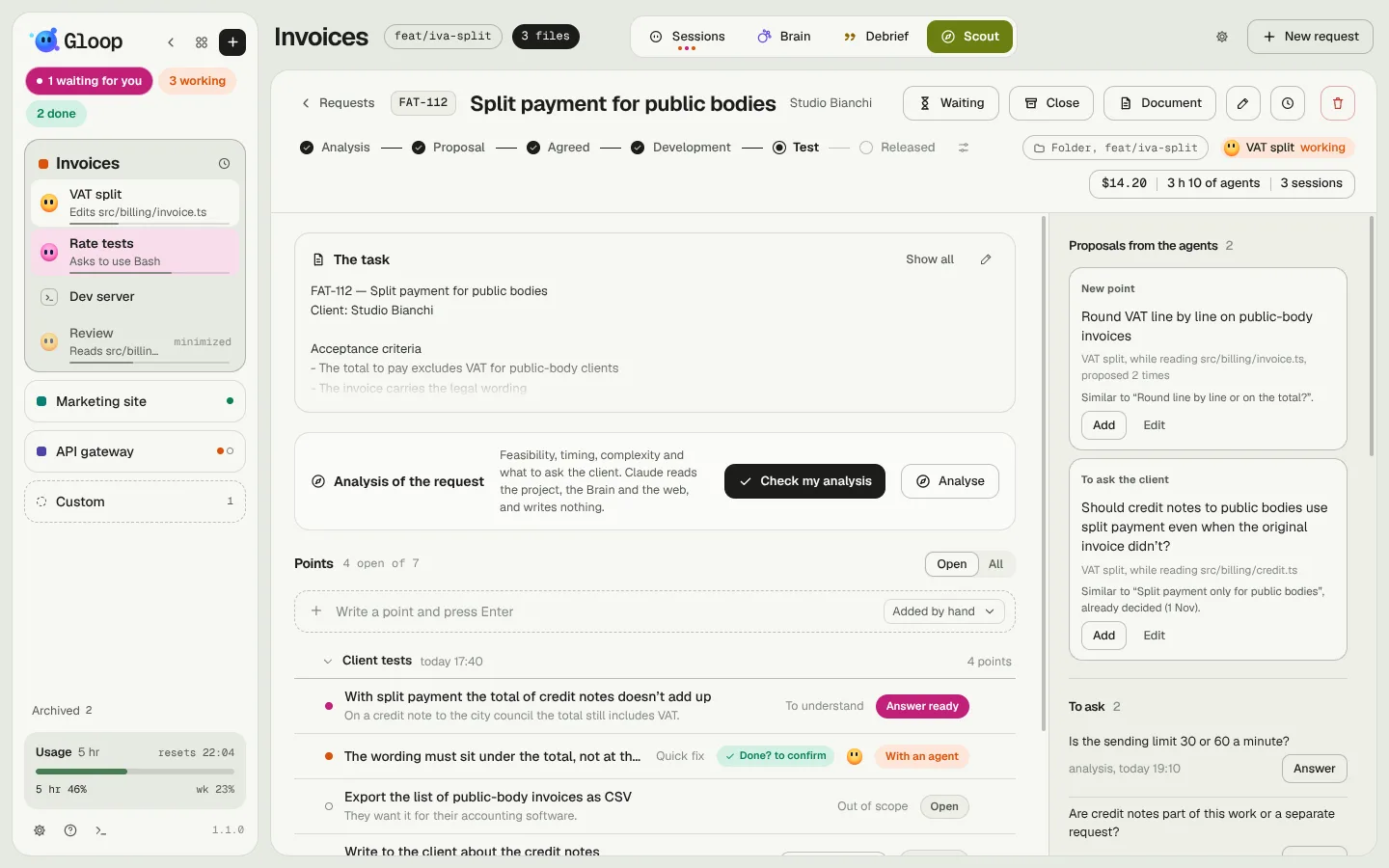
- Analyze a single point, or select several points (a round's box takes all its open points) and analyze them together: each will have its own answer.
- The directions for Claude (some context, a correction, screenshots too) are written on the point, and every analysis reads them. If the point already has an answer, a direction doesn't redo it: Claude updates only the sections that change, and a question gets its answer in Questions and answers.
- Redo only this section on every section of the answer.
- Selecting text in the answer: Quote (puts it in the directions), To ask (among the questions for the client), New point, Copy.
- A point written by hand goes in the Added by hand round, so the client's rounds keep only what the client sent.
What answer you want
You don't always need an analysis: sometimes you want the body of an email, or a short answer. Under "What point is it", What answer you want picks the answer model: the Analysis, or one of yours. A model has a name, What you expect (said the way you'd say it to Claude; Improve rewrites it more precisely), its sections and the highlighted one. Models are written in Scout settings (the gear next to "New request"), and can be copied from another workspace.
Sending the points to work
A point, or several selected points, are sent with Ask Gloop: the coordinator decides how many agents are needed and proposes a plan. The arrow next to it opens the other paths: an open agent (queued if it's working), a new agent, or an agent on its own branch (with the key in its name). For a new agent you choose the model; by default it's Sonnet when all the points are quick fixes.
The agent gets a short message (the points, In short, what to propose, the decisions that concern them) and reads the rest by itself when it needs to. From then on, the points follow the agent: its header shows the request's key, and it can propose questions and new points to you. See The agents' proposals.
Decisions
Mark as decided opens a window that helps you understand what to decide: the open choice, as a question, and 2 to 4 ways of deciding, with the one the analysis proposes marked. A click writes the decision and its why. With the Brain on, the decision also becomes a Brain note, so the agents know it. A decision is edited from its pencil, and the note is updated with it.
Which code it reads
Every Scout Claude reads from one of three places, which you choose in the request:
- the workspace's folder, as it is now, on the branch it's on and with the uncommitted work;
- always a branch: a copy of that branch that Gloop keeps at its latest commit, so your folder can be on another branch;
- a worktree of its own: a new branch, where the analyses read and the request's agents work.
Scout never checks out, pulls or fetches: it only reads. Every answer says which code it was read on (branch and commit); if the folder has switched branch in the meantime, Scout asks you where to read before redoing it.
The list and the filters
The list of requests opens on a filter (Open, Waiting for the client, Closed, All, and those you write). A filter is a line of conditions, for example open phase>=Development client:"Studio Bianchi" -drafts: phase, client, key, waiting for the client, answers ready, agents at work, documents to send, days without news, cost. They're written in Scout settings → Filters, in simple mode (one row per condition), as a query, or in words ("Studio Bianchi's requests stuck for more than a week"). In the list, Search or filter accepts words or the same syntax.
What a request costs
Under the phases, the request's cost: "$14.20 · 3 h 10 of agents · 3 sessions". A click opens the rows, one per agent session and one per Scout job (analyses, documents, client returns), most expensive first. Only the work done while the agent was working on that request counts.
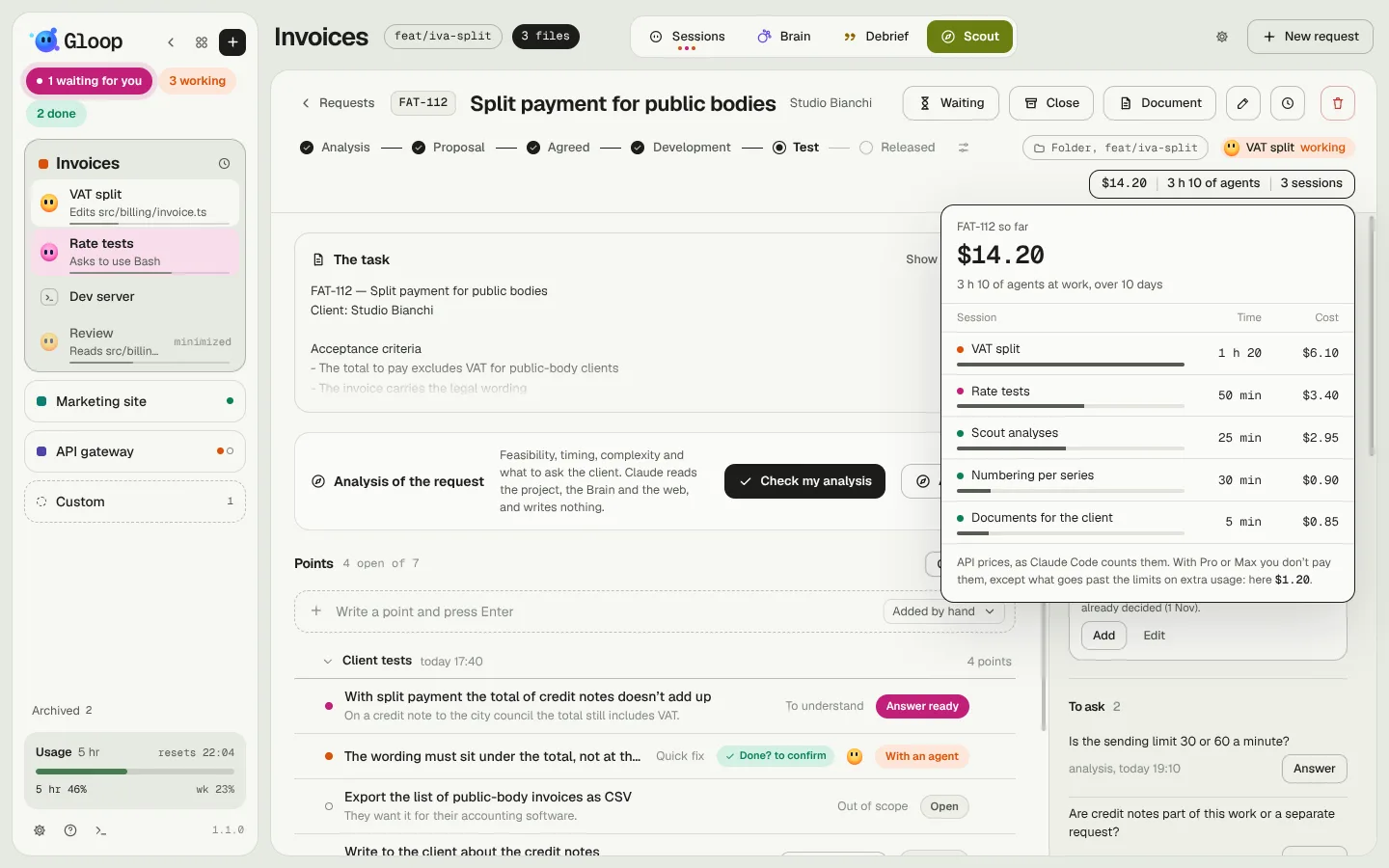
Prices are API prices, the way Claude Code counts them: with a Pro or Max subscription you don't pay them, except the part beyond the limits if you have extra credits. They're there to understand how much a piece of work really weighs. See Usage, limits and costs.