Agents and workspaces
The session panel
Next to every agent: the questions and the plan to answer, the subagents at work, the background commands, the files it read and wrote, with their viewers.
Every agent has a session panel next to it: everything happening in its conversation that the terminal alone doesn't show well. It opens with Session in the pane's header, and by itself when the agent asks you a question.
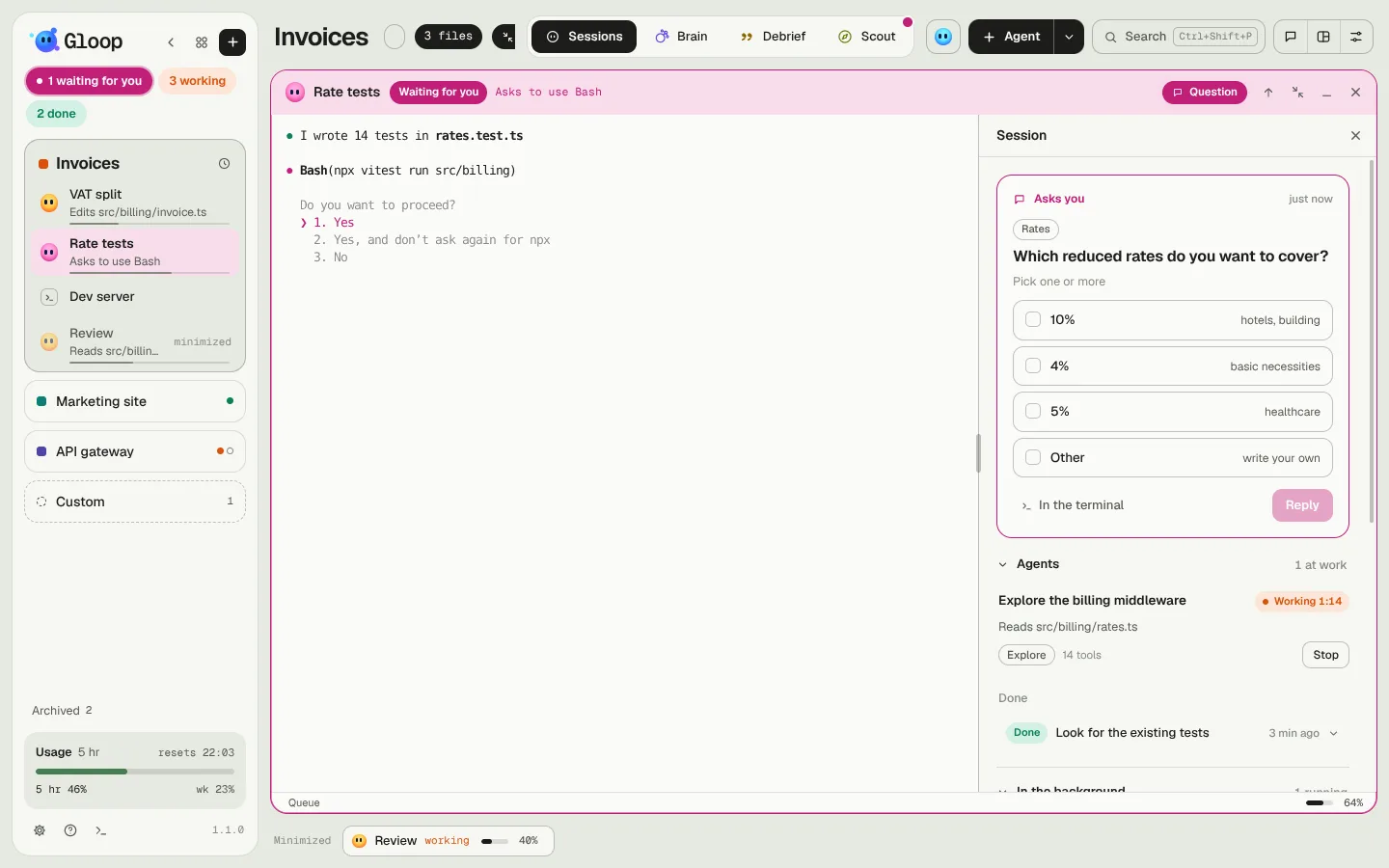
Where it sits depends on how big the pane is: next to the terminal when there's room (drag the edge to widen it, double-click to go back to the normal width), above the terminal in a medium pane, in a window in a small pane. The Session chip tells you what's inside anyway: solid when a question or a plan is waiting for you, with a dot when something is running in the background.
Questions and plan
When Claude asks you a question, it shows here as a card: the question, its options (one or more, depending on the question), Other to write your own answer. Reply sends it; In the terminal leaves the question to the terminal, as if Gloop weren't there.
A plan reads formatted. You approve it, or write what to change and Claude redoes it.
Below, Answers given keeps the questions you've already answered (including those answered in the terminal) and the approved plans, with any changes you asked for.
Subagents
Claude Code can send subagents to do a piece of work (search the code, write tests). The panel shows them while they work: what they were asked, what they're doing, for how long, how many tools they've used. Finished ones become rows you open to read what they reported.
Stop stops a subagent: from then on each of its actions is refused, so it wraps up and reports what it has. A command already started finishes first.
Background commands
The commands Claude leaves running in the background (a dev server, tests in watch mode) show with their state: running or finished. Stop closes them, together with the processes they opened.
The session's files
The panel gathers the files that matter in the conversation:
- the images Claude read or that a tool showed it;
- the documents it writes: Markdown, HTML pages, and the text files it writes outside the project's changes (a test SQL, a JSON, a log). The code it changes in the project isn't here: it's in Changes.
Every file opens in its own viewer:
| File | How it shows |
|---|---|
| Markdown | Formatted, to read. |
| HTML | In an isolated window of the app. From the File menu you export it to PDF (A4) or print it; from the panel, PDF exports it without opening it. |
| CSV, TSV | A table you sort by column. |
| JSON | With a filter by path, for example .items[0].name or .users[].email. |
| Mermaid | The diagram drawn, also inside a Markdown file. |
| Code and text | With line numbers and colours. |
Every file has Copy and Ask a question about this file: the question goes to the agent as a message (queued if it's working), and Claude re-reads the file itself, so it answers about the version of now.
Gloop always shows the file as it is on disk at that moment, never an old copy.
The conversation's memory
What the panel shows (questions and answers, subagents, files, commands) is saved per conversation, in the app's data: resume a session tomorrow and the panel is back as it was. New session starts with an empty panel.
When you close
When you close an agent, the confirmation lists the files Claude created in the session outside the project's changes (outside the folder, or ignored by git), each with its box: you can delete them together with the session. A file git sees as changed never appears in this list.